


Chereads
4.21.19K Reviews
App Specs
- Version
- 4.3.9
- Updated On
- License
- Free
- Downloads
- 500,000+
- Developer
- Cloudary
- Categories
- Books & Reference
- Platform
- Android
Screenshots




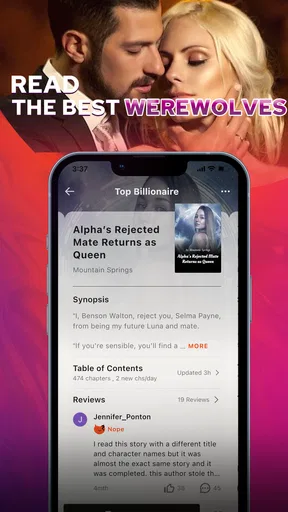
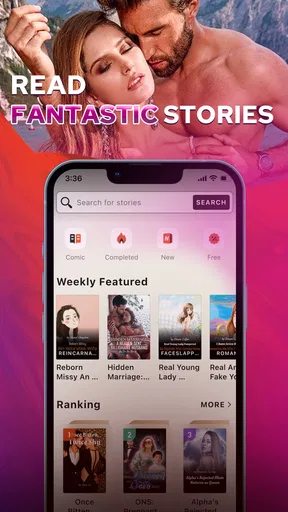
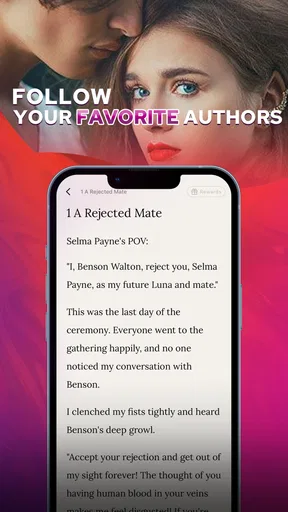
 Analysis by AppCompare
I tend to choose a reading app by asking one simple question: do I want a quiet shelf of books, or a place where discovering stories and talking about them are part of the same routine? Chereads is aimed at the second kind of reader. It is a free Books & Reference app from Cloudary, with a Teen content rating, and its mix of fiction discovery, reading tools, and community features gives it a more social feel than a basic ebook reader. I would consider it when I want something new to follow, rather than when I already have a carefully organized collection of books elsewhere.
Who is likely to enjoy it
The app makes the most sense for readers who browse by mood and genre. If I have a few spare minutes and want romance, fantasy, or mystery, a categorized library and recommendations can make choosing a story feel less like homework. That discovery-first approach is especially useful when I have finished a book and do not yet know what I want next. Instead of searching for one specific title, I can explore and save possibilities for later.
It also suits people who enjoy reacting to a story while they read. Comments and discussions can turn a solitary reading session into a shared one, particularly when a chapter leaves me with a question or a strong opinion about a character. I would not assume every book has an equally active conversation, though; community value depends on whether other readers are following the same story. If you mostly want a private, distraction-free reading space, that social layer may be something to ignore rather than a reason to install it.
What I would check before settling in
Chereads is free to download, but that does not mean every part of its reading catalog is automatically free. It includes in-app purchases, ranging from $0.99 to $199.99 per item, so I would look carefully at how a story is accessed before getting invested. In particular, check what the app displays around a book’s chapters and any purchase prompts, and decide on a personal spending limit before browsing. The wide range of possible purchase amounts makes that a sensible habit, not a criticism of any single title.
For a low-pressure first try, I would browse a few genres, save stories that catch my eye, and read enough to see whether the writing style and access terms work for me. I would avoid buying anything just because a cliffhanger makes me curious; pausing to inspect the next-step options helps me judge the experience with a clear head. If I want a large personal library that I can manage independently of an app’s own story selection, a conventional ebook store or a local-library reading app may be a better fit.
A practical way to use it
Here is the kind of everyday routine where I can see Chereads earning a place on my phone: I browse in the evening, add a few promising titles to my “To Read” list, and choose one before a commute the next morning. Once I know what I want, I can use the reading display that feels comfortable and, where available, prepare a book for offline reading. That separates discovery from reading and saves me from spending a short break scrolling without making a choice.
A useful tip is to treat recommendations as a starting point, not a verdict. If the app begins suggesting stories based on what I read, I would still check the genre, premise, and opening pages before committing. That helps keep one favorite theme from narrowing my choices too much. I would also use the community selectively: follow discussions when I want reader reactions, but step away if comments risk revealing plot developments before I reach them. For anyone who dislikes spoilers, reading reactions after finishing a section is a safer habit than opening every thread as soon as it appears.
Worth Reading Before You Choose

Flipboard Shows What News Apps Must Do Beyond the Feed

Switching to Android Auto Means Rethinking Your Driving Routine

Google Calendar Makes a Crowded Week Easier to Manage

Ludo King Makes the Most of the Minutes Between Plans

Baby Panda World Brings Quick Play to Modern Phones, but Its Game Library Feels Busy

ESPN’s Live Game View Makes Following Close Games Easier
How it differs from a plain ebook reader
The main trade-off is between an app-centered reading world and a portable personal bookshelf. A traditional ebook reader or bookstore app is often the more natural choice when I care most about managing purchased titles, browsing familiar publishers, or keeping my reading experience quiet. A library app is better when borrowing is the priority. Chereads has a different appeal: it joins story discovery with reader interaction, so I would choose it for browsing and following fiction rather than as a universal replacement for every book source I use.
That distinction matters if you switch from another service. Before moving your reading routine, make a note of any books you are partway through and where you left off; do not assume a reading position or saved list will transfer between apps. I would keep the old app installed until I have confirmed that the stories I care about are available here and that the purchase approach suits me. The small effort of testing first can prevent the frustration of abandoning a book mid-plot or paying for access without understanding the terms.
Exploring the Library
One of the first things you'll notice about Chereads is its extensive library. Seriously, it's like a treasure trove of books just waiting to be discovered. The app categorizes everything neatly, making it super easy to navigate. Whether you're on the hunt for a steamy romance or a mind-bending thriller, finding what you want is a breeze. I found myself scrolling through the endless options, adding more books to my "To Read" list than I'll probably ever get through!
Customization and Personalization
Customization is where Chereads really shines. You can tweak the reading experience to suit your preferences, from adjusting the font size to choosing between day and night modes. I personally love the night mode – it’s easy on the eyes during late-night reading marathons. Plus, the app learns from your reading habits and starts recommending books based on your interests. It's like having a personal librarian who knows exactly what you crave.
For a more comfortable session, I would adjust the font before I begin a long chapter rather than stopping repeatedly once I am absorbed in the story. I also find it useful to decide whether I want a bright or dim display based on the room, not just the time of day. Those small choices make the app easier to settle into, although readers who need very specialized accessibility controls should check whether the available display settings meet their needs before relying on it as their main reader.
Interactive Community
Now, I'm not just a solitary reader; I love discussing books with fellow enthusiasts, and Chereads nails this aspect. There's an interactive community feature where you can join discussions, leave comments, and even interact with authors. I've had some fascinating exchanges with other readers, debating plot twists and character arcs. It's a vibrant space that adds another layer of enjoyment to the reading experience.
I would use those conversations as a companion to a story, not a substitute for reading it. Other readers can point out details I missed or offer a different interpretation, but comments can also shape my expectations before I reach the relevant scene. A good compromise is to browse discussion after completing a chapter or story section, then return to reading without trying to keep up with every thread. Readers who prefer to avoid social features altogether can still focus on the text, but they will get less of what makes this app distinct from a straightforward reader.
Seamless User Experience
In terms of user experience, Chereads is pretty seamless. The interface is sleek, intuitive, and doesn't overwhelm you with ads, which is a huge plus in my book (pun intended). The app runs smoothly on both Android and iOS, and I haven’t encountered any glitches so far. Downloading books for offline reading is straightforward, making it perfect for those long commutes or flights.
Offline access is most useful when I plan ahead: I would open the title and prepare it before leaving a reliable connection, then check that it is ready before heading out. That is a practical safeguard for a train ride, a waiting room, or travel where a signal may come and go. It is also worth separating “offline reading” from “offline browsing”: I would not count on being able to discover new stories or join discussions without a connection. If reading without internet is your main requirement, test the specific titles and workflow you expect to use before depending on them during a trip.
Compatibility is another sensible checkpoint. Chereads is listed for devices running Android 5.0 or later, and the current version is 4.3.5. The app has a 4.3 average from around 18,000 ratings, with roughly 1,200 written reviews and more than 500,000 installs. Those figures suggest that it has found an established audience, but they cannot tell me whether its catalog matches my taste or whether I will enjoy its community. I would use a short trial of browsing and reading to answer those personal questions.
Subscription Model
Okay, let's talk about the subscription model. Chereads offers both free and premium options. The free version gives you access to a decent selection of books, but if you're a voracious reader or want the full library at your disposal, the premium subscription is the way to go. It's reasonably priced, and honestly, the additional features and book selection are worth it if you're serious about your reading.
For my own decision, I would focus less on the label “premium” and more on the stories I actually want to read and the way access is presented for each one. In-app purchase amounts can range from $0.99 to $199.99 per item, so it is worth checking the cost shown at the point of choice rather than assuming one payment unlocks everything. I would start with the free material, see how often I return, and only spend when the value is clear to me. That approach is particularly helpful for readers who enjoy sampling several stories but do not want casual browsing to turn into an open-ended bill.
Final Thoughts
All in all, Chereads has become my go-to app for discovering new stories. It's not just about reading; it's about becoming part of a community of book lovers. Whether you're a casual reader or a devout bibliophile, there's something here for everyone. The app's ability to combine a vast selection of books with a personalized and interactive experience makes it a standout in the world of reading apps. So, if you haven't already, give Chereads a try – you might just find your next favorite book!
My recommendation is strongest for someone who enjoys serialized fiction, likes browsing by genre, and wants the option of discussing what they read. It is a weaker match if you want a completely quiet interface, a library organized around books you already own, or a reading budget with no per-item decisions. In those cases, I would compare it with a dedicated ebook store or library app before moving my routine. Chereads is free to try, but its in-app purchases make a little caution worthwhile; I would begin with browsing and free reading, then decide from actual use whether its blend of discovery and community earns a permanent spot on my phone.
Pros
- User-friendly interface enhances reading experience.
- Wide selection of genres and authors available.
- Offline reading mode saves data and battery.
- Customizable font and background settings.
- Regular updates with new stories and features.
Cons
- In-app ads can be disruptive during reading.
- Some premium content requires payment.
- Limited social interaction features.
- Occasional bugs with bookmarking feature.
- No audiobook options available.
FAQs for Chereads
What is Chereads and what can I use it for?
Chereads is an app designed for avid readers who enjoy exploring a variety of genres. It offers a vast library of novels, ranging from romance to thriller, allowing users to read and discover new stories. The app is perfect for those looking to indulge in engaging narratives and connect with a community of fellow book lovers.
Is Chereads available for both Android and iOS devices?
Yes, Chereads is available for download on both Android and iOS platforms. Users can easily find the app on the Google Play Store and Apple App Store. The app is designed to work seamlessly across different devices, ensuring a smooth reading experience regardless of the platform.
Does Chereads require a subscription to access its content?
Chereads offers both free and premium content. While users can access a selection of novels for free, a subscription is required to unlock the full library and enjoy an ad-free experience. The subscription provides additional features such as exclusive content and early access to new releases.
How often is new content added to Chereads?
Chereads frequently updates its library with new novels and chapters. The app collaborates with a wide range of authors, ensuring that users have access to fresh content regularly. This keeps the reading experience dynamic and exciting, with new stories and genres continuously being introduced.
Can I interact with other users on Chereads?
Yes, Chereads fosters a community-driven environment where users can interact with each other. Readers have the opportunity to leave comments, rate books, and engage in discussions with fellow readers. This interactive aspect enhances the overall experience, allowing users to share their thoughts and recommendations.


